> For the complete documentation index, see [llms.txt](https://docs.opencityitalia.it/llms.txt). Markdown versions of documentation pages are available by appending `.md` to page URLs; this page is available as [Markdown](https://docs.opencityitalia.it/stanza-del-cittadino/sviluppatori-e-partner-tecnologici/sviluppo/temi-grafici.md).
# Temi grafici
L'aggiunta di un tema grafico richiede una modifica al Core della piattaforma, in queste pagine si da indicazione dei temi presenti e di come predisporre una Merge-Request per aggiungerne uno nuovo.
### Come creare un MR per aggiungere un tema
Step preparativi alla modifica:
* Clonare il repository [core repository](https://docs.opencityitalia.it/installazione-e-manutenzione/installazione)
* Posizionarsi sul branch master
* Creare un nuovo branch di nome add-theme-$themename e spostarsi sul nuovo branch con il comando `git checkout -b "add-theme-$themename"` sostituendo con il nome del nuovo tema che si vuole creare (per le indicazioni sui nomi dei temi vedere sotto)
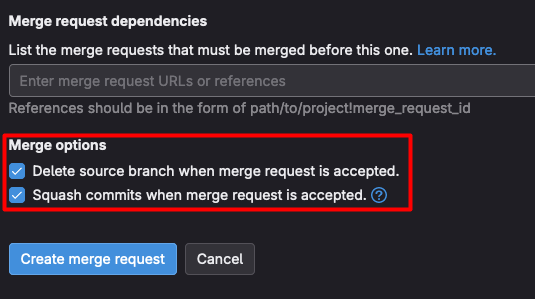
* Creare una MR sul branch che effettui squash di tutti i commit del branch ed elimini il branch una volta mergiato come di seguito:
Successivamente creare un nuovo file in `./assets/styles` copiando il contenuto di seguito che dovrebbe coincidere con il file `default.scss.` Il nome del file deve coincidere con il nome che avrà il tema e avere l'estensione .scss (l nome del tema può contenere solo lettere e il carattere \`-\`, deve rispondere cioè alla espressione regolare \[a-z]\[a-z0-9-]+. Es: se si vuole creare il tema "amaranto" aggiungiamo un file `amaranto.scss`):
```scss
@charset "UTF-8";
$primary: #3478bd;
$primary-a5: $primary;
$primary-a6: $primary;
$primary-a7: $primary;
// Header
$header-slim-bg-color: #2b649e; // Colore di background del top header
$header-slim-button-color: #2b649e; // Colore di background del bottone di accesso all'area personale
$header-slim-button-hover-color: $primary; // Colore di background del bottone di accesso all'area personale su hover
$header-center-bg-color: #3478bd; // Colore di background del header centrale
//$header-center-text-color: #fff; // Colore del testo del header centrale
// Footer
$bg-footer: #16334f; // Colore di background del footer
// Content
$card-link-color: $primary; // Colore link all'interno delle card
@import "core";
```
* Nel file cambiare le opzioni ed i colori a proprio piacimento
* Si compila il nuovo tema su webpack aggiungendo nel file [webpack.config.js](https://docs.opencityitalia.it/installazione-e-manutenzione/installazione) StyleEntry come di seguito: `.addStyleEntry('amaranto', './assets/styles/amaranto.scss')` (Il nome deve coincidere con il nome del file creato in precedenza). I colori devono tenere conto della linea guida Accessibilità.
* Si aggiunge alla piattaforma il nuovo tema aggiornando nel file [src/Model/Tenant/ThemeOptions.php](https://docs.opencityitalia.it/installazione-e-manutenzione/installazione) la costante `THEMES` e inserendo il nuovo tema come di seguito: `'Amaranto' => 'amaranto'`
---
# Agent Instructions
This documentation is published with GitBook. GitBook is the documentation platform designed so that both humans and AI agents can read, navigate, and reason over technical content effectively. Learn more at gitbook.com.
## Querying This Documentation
If you need additional information that is not directly available in this page, you can query the documentation by asking a question.
Perform an HTTP GET request on the following URL with the `ask` and `goal` query parameters:
```
GET https://docs.opencityitalia.it/stanza-del-cittadino/sviluppatori-e-partner-tecnologici/sviluppo/temi-grafici.md?ask=&goal=
```
`ask` is the immediate question: it should be specific, self-contained, and written in natural language.
`goal` is what the user is ultimately trying to achieve, the reason they need the answer. Sharing it helps GitBook give you a better, more relevant answer. A goal is most helpful when it describes the outcome the user wants rather than restating the question. For example, with `ask=how do I create an API token`, a goal like `automate deployments from our CI pipeline` lets GitBook tailor the answer to that use case.
The response will contain a direct answer to the question and relevant excerpts and sources from the documentation.
Use this mechanism when the answer is not explicitly present in the current page, you need clarification or additional context, or you want to retrieve related documentation sections.