> For the complete documentation index, see [llms.txt](https://docs.opencityitalia.it/llms.txt). Markdown versions of documentation pages are available by appending `.md` to page URLs; this page is available as [Markdown](https://docs.opencityitalia.it/stanza-del-cittadino/gestione-delle-pratiche/gestire-le-pratiche-online/modifica-il-file-.csv-con-i-dati-delle-pratiche.md).
# Modifica il file .CSV con i dati delle pratiche
{% hint style="warning" %}
Il file .csv esporta solo i campi testuali semplici di una pratica. Non include i dati inseriti in questi componenti:
* Datagrid — ogni riga aggiunta dal cittadino, con tutti i campi che la compongono;
* Address — l'indirizzo geolocalizzato e i suoi sottocampi;
* Address map — l'indirizzo selezionato dalla mappa;
* Select boxes — le opzioni selezionate tra più scelte;
* Select con l'opzione "Multiple values" attiva — i valori multipli selezionati dalla stessa select;
* Checkbox — lo stato di selezione del campo.
Per accedere a questi dati, usa le [API della piattaforma](https://servizi.comune.bugliano.pi.it/lang/api/doc).
{% endhint %}
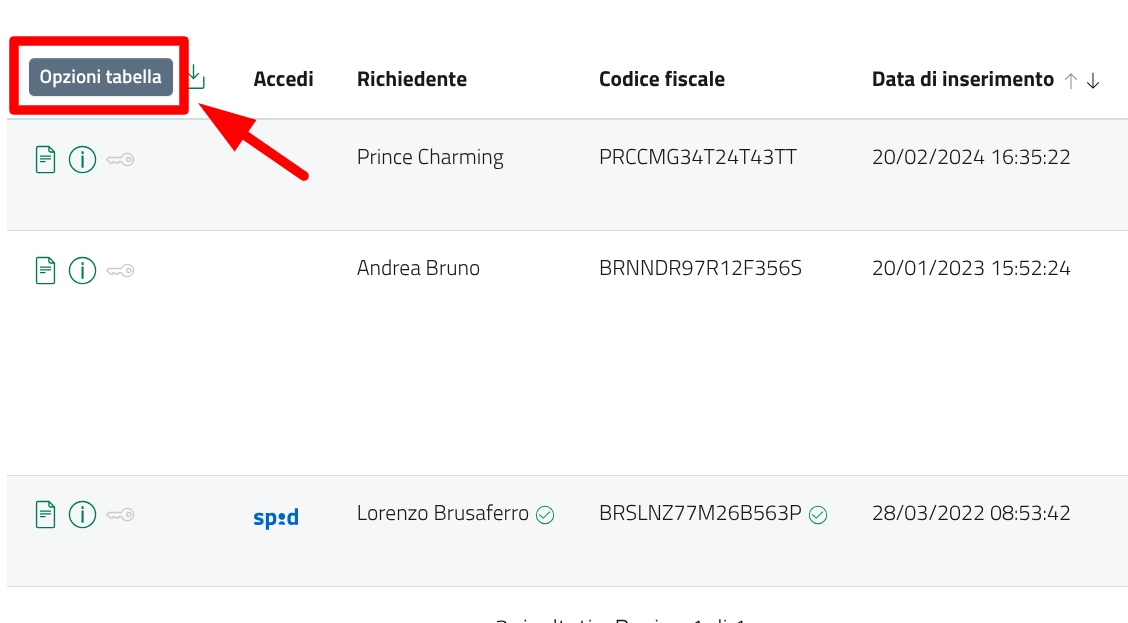
Per personalizzare il file .csv, devi prima filtrare le pratiche per [stato](/stanza-del-cittadino/gestione-delle-pratiche/gestire-le-pratiche-online/filtra-le-pratiche-per-stato.md) e poi cliccare sulla funzione "Opzioni tabella"
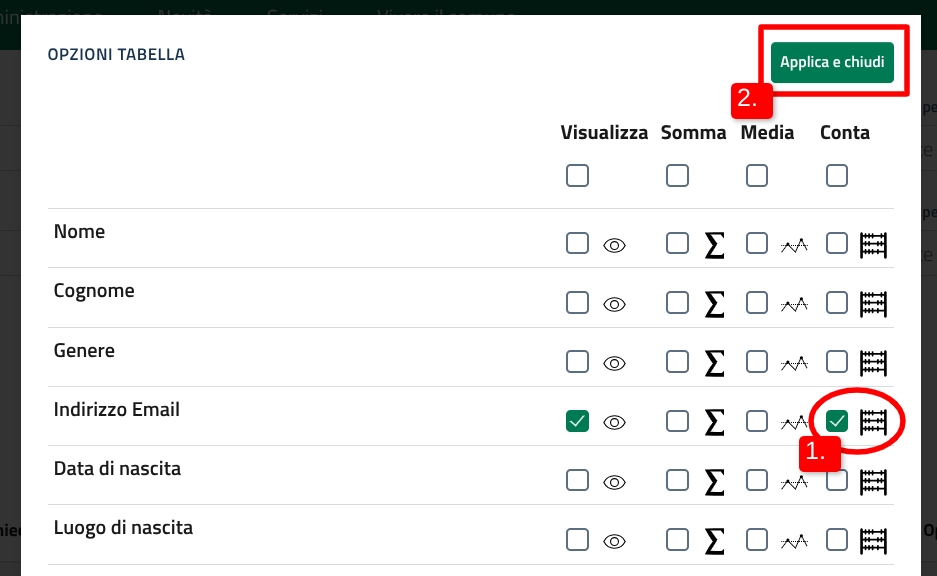
Nella scheda che si apre successivamente trovi tutti i campi che compongono il servizio per cui hai attivato il filtro. Clicca sulla funzione di conta del campo che vuoi importare (1) e clicca su "Applica e chiudi" (2).
Una volta fatto [scarica il .csv](/stanza-del-cittadino/gestione-delle-pratiche/gestire-le-pratiche-online/scarica-i-dati-delle-pratiche-in-formato-.csv.md) con i dati indicati nelle "Opzioni tabella".
---
# Agent Instructions
This documentation is published with GitBook. GitBook is the documentation platform designed so that both humans and AI agents can read, navigate, and reason over technical content effectively. Learn more at gitbook.com.
## Querying This Documentation
If you need additional information that is not directly available in this page, you can query the documentation dynamically by asking a question.
Perform an HTTP GET request on the current page URL with the `ask` query parameter, and the optional `goal` query parameter:
```
GET https://docs.opencityitalia.it/stanza-del-cittadino/gestione-delle-pratiche/gestire-le-pratiche-online/modifica-il-file-.csv-con-i-dati-delle-pratiche.md?ask=&goal=
```
`ask` is the immediate question: it should be specific, self-contained, and written in natural language.
`goal` is optional and describes the broader end goal you are ultimately trying to accomplish on behalf of the user. GitBook uses it to tailor the answer towards what is most useful for that goal.
The response will contain a direct answer to the question and relevant excerpts and sources from the documentation.
Use this mechanism when the answer is not explicitly present in the current page, you need clarification or additional context, or you want to retrieve related documentation sections.