> For the complete documentation index, see [llms.txt](https://docs.opencityitalia.it/llms.txt). Markdown versions of documentation pages are available by appending `.md` to page URLs; this page is available as [Markdown](https://docs.opencityitalia.it/sito-web/moduli-integrativi-della-piattaforma/moderare-i-contenuti-del-sito/lutente-moderato.md).
# L'utente moderato
L'utente moderato può creare e modificare nuovi contenuti, che vengono sottoposti alla revisione dei redattori/moderatori
{% hint style="warning" %}
Un utente moderato **può**:
* proporre nuovi contenuti e modifiche ai contenuti già esistenti;
* continuare a modificare i contenuti già inviati in approvazione;
* annullare la richiesta di approvazione;
* inserire dei commenti.
Un utente moderato **non può**:
* pubblicare autonomamente un contenuto;
* eliminare un contenuto;
* spostare un contenuto.
{% endhint %}
## Dashboard di moderazione per gli utenti moderati
{% hint style="warning" %}
L'utente moderato **visualizza solo i propri contenuti in attesa di moderazione**, non quelli di altri utenti.
{% endhint %}
L’utente moderato dispone di un pannello di controllo, raggiungibile dal [menù del redattore](/sito-web/la-piattaforma/il-menu-redattore.md) e cliccando su "Moderazione".
La dashboard permette di controllare tutte le attività e di visualizzare i contenuti:
* da leggere (contenuti per cui è stato aggiunto un commento da un moderatore) (1).
* in attesa di moderazione (2);
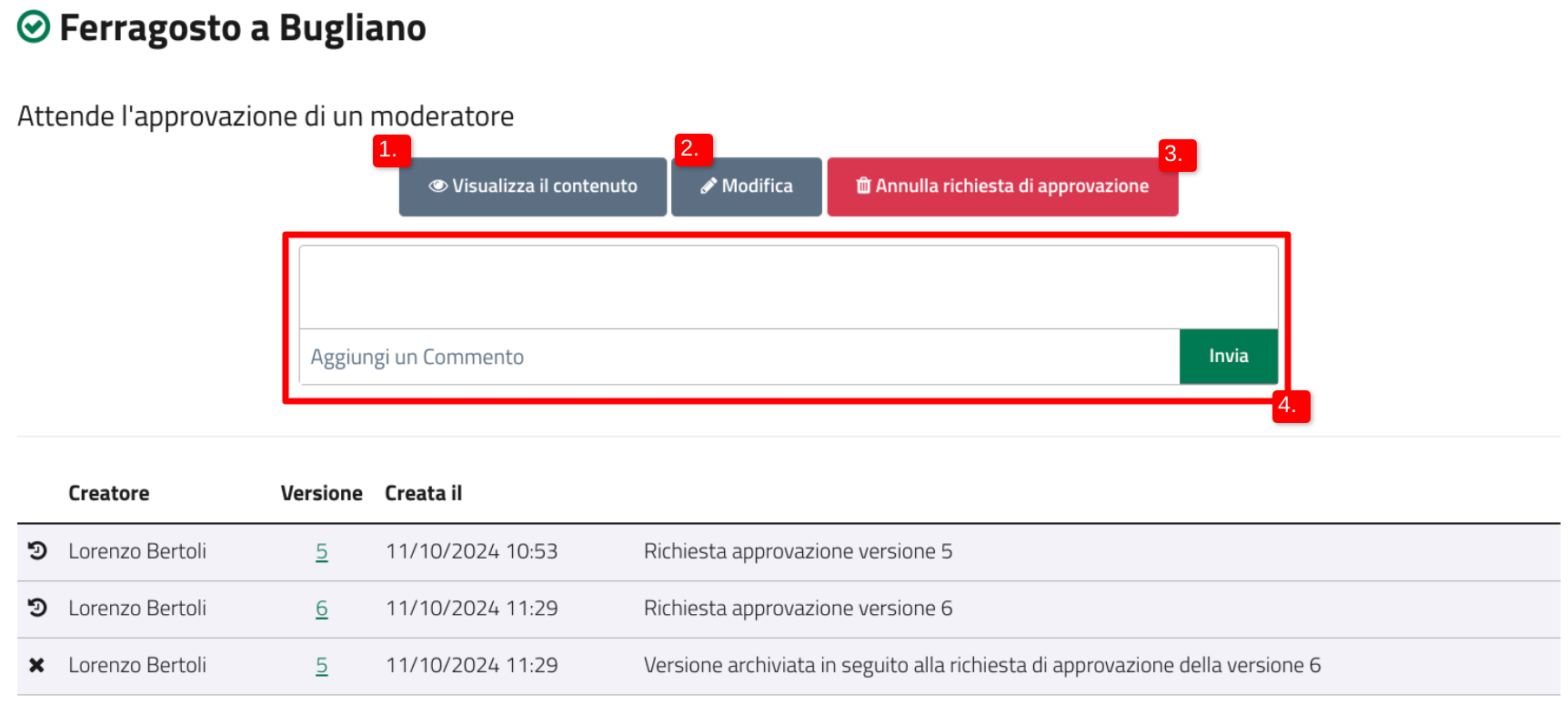
Cliccando su “Dettagli”, l’utente moderato può:
* visualizzare l’anteprima del contenuto (1);
* modificare il contenuto (2);
* annullare la richiesta di approvazione il contenuto (per le versioni ancora da approvare) (3);
* leggere o aggiungere un commento (4).
## Le notifiche
{% hint style="info" %}
Quando un contenuto viene approvato o rifiutato oppure viene aggiunto un commento, l’utente moderato riceve una notifica.
{% endhint %}
Il numero di notifiche presenti viene sempre indicato nel menù del redattore, alla voce "Moderazione"
Tutte le notifiche sono eventualmente indicate anche nella sezione “Da leggere” della [dashboard di moderazione](#dashboard-di-moderazione-per-gli-utenti-moderati).
---
# Agent Instructions
This documentation is published with GitBook. GitBook is the documentation platform designed so that both humans and AI agents can read, navigate, and reason over technical content effectively. Learn more at gitbook.com.
## Querying This Documentation
If you need additional information that is not directly available in this page, you can query the documentation by asking a question.
Perform an HTTP GET request on the following URL with the `ask` and `goal` query parameters:
```
GET https://docs.opencityitalia.it/sito-web/moduli-integrativi-della-piattaforma/moderare-i-contenuti-del-sito/lutente-moderato.md?ask=&goal=
```
`ask` is the immediate question: it should be specific, self-contained, and written in natural language.
`goal` is what the user is ultimately trying to achieve, the reason they need the answer. Sharing it helps GitBook give you a better, more relevant answer. A goal is most helpful when it describes the outcome the user wants rather than restating the question. For example, with `ask=how do I create an API token`, a goal like `automate deployments from our CI pipeline` lets GitBook tailor the answer to that use case.
The response will contain a direct answer to the question and relevant excerpts and sources from the documentation.
Use this mechanism when the answer is not explicitly present in the current page, you need clarification or additional context, or you want to retrieve related documentation sections.
.png?alt=media)
.png?alt=media)
.png?alt=media)