> For the complete documentation index, see [llms.txt](https://docs.opencityitalia.it/llms.txt). Markdown versions of documentation pages are available by appending `.md` to page URLs; this page is available as [Markdown](https://docs.opencityitalia.it/connect/le-funzioni/gli-utenti.md).
# Gli utenti
{% hint style="warning" %}
Le funzioni descritte in questa pagina sono disponibili solo per l'amministratore.
{% endhint %}
Dalla sezione **Utenti**, l'amministratore può consultare l'elenco degli utenti della piattaforma, verificare i permessi assegnati e modificarne il ruolo, per esempio da Operatore a Service Manager.
## Invitare nuovi utenti
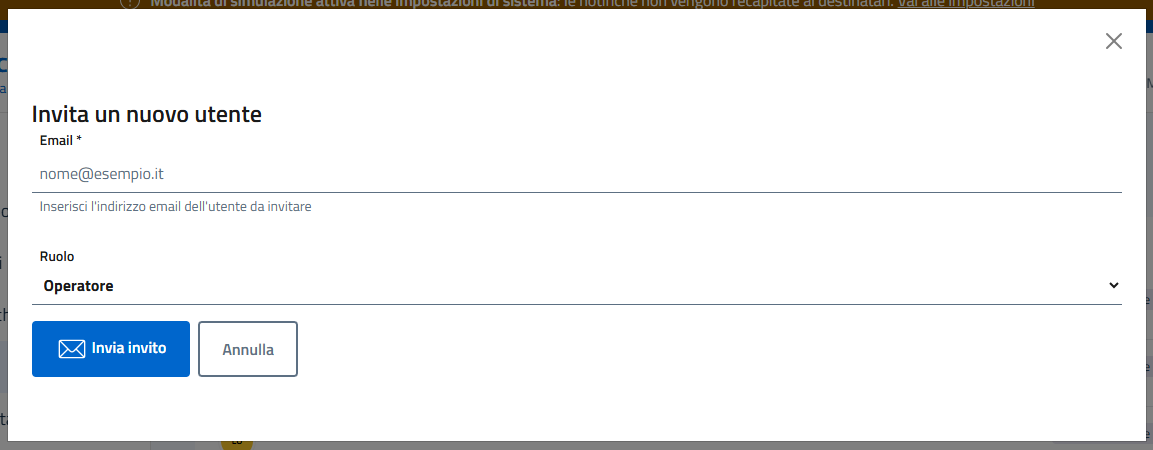
Dalla stessa sezione, l'amministratore può invitare nuovi utenti ad accedere alla piattaforma tramite email.
## Ruoli disponibili
Sono disponibili questi ruoli:
| Ruolo | Cosa può fare |
| ------------------- | --------------------------------------------------------------------------------------------------------------------------------------- |
| **Amministratore** | Gestisce la piattaforma, crea nuovi utenti, attiva e disattiva servizi ed eventi, invia messaggi, personalizza i template di messaggio. |
| **Service Manager** | Attiva e disattiva eventi, invia messaggi, personalizza i template di messaggio per i servizi assegnati. |
| **Operatore** | Invia messaggi per i servizi assegnati |
### Gestione degli inviti
Nella sezione **Inviti**, l'amministratore può monitorare ogni invito fino al primo accesso dell'utente.
Ogni invito mostra lo stato del link:
* **Link di invito valido fino al GG/MM/AAAA**: l'utente può completare la registrazione.
* **Link non più valido (usato o scaduto)**: è necessario generare un nuovo invito.
* **L'utente ha già un account su Connect**: non viene creato alcun link e la persona riceve solo una mail per accedere.
Lo stato si aggiorna automaticamente all'apertura della pagina.
Per ogni invito sono disponibili queste azioni, anche dal menu ⋮:
* **Reinvia mail** (1): invia di nuovo la stessa mail con lo stesso link.
* **Genera nuovo invito** (2): crea un nuovo link, disattiva quello precedente e invia una nuova mail. È utile quando il link è scaduto o già usato.
* **Revoca** (3): annulla l'invito e rende il link non più valido.
---
# Agent Instructions
This documentation is published with GitBook. GitBook is the documentation platform designed so that both humans and AI agents can read, navigate, and reason over technical content effectively. Learn more at gitbook.com.
## Querying This Documentation
If you need additional information that is not directly available in this page, you can query the documentation by asking a question.
Perform an HTTP GET request on the following URL with the `ask` and `goal` query parameters:
```
GET https://docs.opencityitalia.it/connect/le-funzioni/gli-utenti.md?ask=&goal=
```
`ask` is the immediate question: it should be specific, self-contained, and written in natural language.
`goal` is what the user is ultimately trying to achieve, the reason they need the answer. Sharing it helps GitBook give you a better, more relevant answer. A goal is most helpful when it describes the outcome the user wants rather than restating the question. For example, with `ask=how do I create an API token`, a goal like `automate deployments from our CI pipeline` lets GitBook tailor the answer to that use case.
The response will contain a direct answer to the question and relevant excerpts and sources from the documentation.
Use this mechanism when the answer is not explicitly present in the current page, you need clarification or additional context, or you want to retrieve related documentation sections.